How to Make a Dado Jig for Router: Step-by-Step Guide
Build a dado jig for router that helps you cut accurate dadoes, grooves, rabbets, and even small mortises. Follow the step-by-step guide, video, and tips to make your own adjustable router jig.
I wanted to build this dado jig for router for a long time, and honestly, I regret not making it sooner. If you have a router in your workshop, this is one of those simple jigs that quickly becomes useful for many different projects.
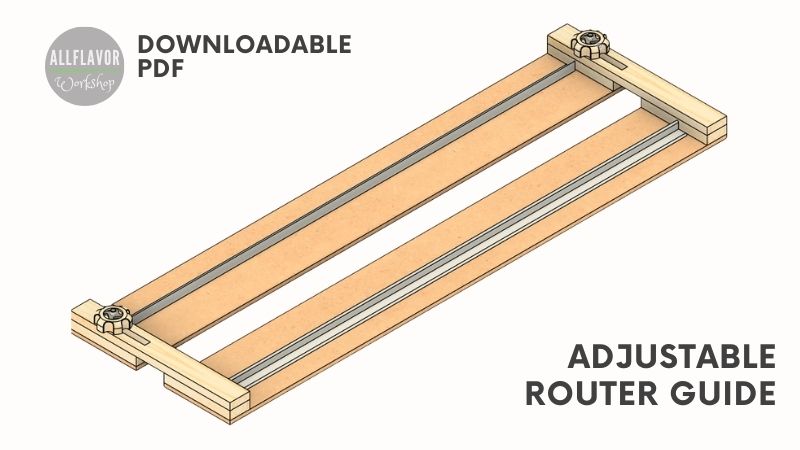
The jig helps you cut accurate dadoes, grooves, rabbets, and even small mortises. It is adjustable, inexpensive to build, and easy to use once you understand the setup. For me, the biggest benefit is that you can set the jig to the exact thickness of your material and cut a dado that fits nicely without guessing.
This version is sized at 700 × 200 mm and gives me about 500 mm of usable cutting length, depending on the size of the router base. I built it for my DeWalt trim router and a 6 mm straight router bit, but the same idea can be adjusted to fit other routers and bit sizes.
In this article, I’ll show you how to make a dado jig for router step by step, how the jig works, and how to use it to cut clean, repeatable dadoes and grooves. I also have downloadable plans available if you want the dimensions and build details in a cleaner format while working in the shop.
If you want to see the full build process, watch the video below. I show how I make the base pieces, attach the aluminum guide rails, assemble the adjustable parts, and test the jig by cutting dadoes with the router.
If you enjoy the video, I’d really appreciate it if you subscribed to my YouTube channel. It helps me keep creating more woodworking jigs, project plans, and step-by-step build guides.
*Safety is your responsibility. Make sure you know what you’re doing and take all necessary safety precautions while working with power tools. Safety comes first! Always be cautious when using any power tool.
Router Dado Jig Plans PDF
I also offer a premium version of the Router Dado Jig plans, which includes:
✔ Metric and imperial measurements ✔ Detailed materials and hardware lists ✔ Exploded views and assembly drawings ✔ Additional build information and workshop tips ✔ Improvements and other resources
Before starting the build, prepare the materials and tools for the router dado jig. The jig is mainly made from thin MDF, wooden strips, aluminum L-angles, and a few bolts and knobs for adjustment.
I used 5 mm MDF for the base because it is flat, smooth, and does not take away too much of the router bit length. HDF or thin plywood can also work, as long as the material is straight and stable.
Router Jig:
2x MDF desk (700 x 95 x 5 mm) -> start with one MDF desk (700 x 200 x 5 mm)
Disclosure: Some of the links above are affiliate links. If you purchase through them, I may earn a small commission at no extra cost to you. Thanks for supporting AllFlavor Workshop.
Here is a quick overview of the router dado jig before we get into the build. The jig is simple, but it is very useful in the workshop because it lets you cut accurate dadoes, grooves, rabbets, and even small mortises with a router.
Item
Details
Project
DIY router dado jig
Main use
Cutting dadoes, grooves, rabbets, and small mortises
Finished size
700 × 200 × 30 mm
Usable cutting length
About 500 mm, depending on the router base size
Main material
MDF base, spruce strips, aluminum guide rails
Router bit
Designed for one specific bit size; this build uses a 6 mm straight bit
Difficulty
Beginner-friendly
Best for
Shelves, cabinet parts, dados, grooves, rabbets, and repeatable router cuts
Before You Start: Dados, Grooves, Rabbets, and Router Bits
Before building the jig, it helps to understand what you can use it for. This router dado jig is not only for dadoes — you can also use it for grooves, rabbets, and even small mortises.
1. How Difficult Is It to Build?
This is a beginner-friendly router jig and the build process is quite straightforward. You don’t need many special tools, and most of the parts are simple strips, guide rails, screws, and adjustment pieces.
The most important part is accuracy. Take your time when attaching the guide rails and setting the zero-clearance edge with your router. Once that part is done correctly, the jig becomes much easier to use.
2. What Is the Difference Between a Dado and a Groove?
A dado and a groove are very similar cuts. The main difference is the direction of the cut in relation to the wood grain.
A dado is cut across the grain, while a groove is cut with the grain. Both are used to create channels for shelves, dividers, panels, or other parts that need to fit into the workpiece.
3. What Is the Difference Between a Dado and a Rabbet?
A dado is a channel with two side walls, while a rabbet is open on one side. You can think of a rabbet as a dado cut along the edge of a board.
A dado joint is usually stronger because the inserted piece is supported from both sides. A rabbet is still very useful, especially for cabinet backs, drawer parts, frames, and edges.
If you want to cut rabbets regularly with a router, I also have a dedicated Router Rabbet Jig that makes it easier to position the router and keep the cut square to the edge.
Cutting a rabbet on a table saw
4. Which Router Bit Should I Use for Dadoes?
For this jig, I used a 6 mm straight router bit. A straight bit is simple, affordable, and works well for most dadoes and grooves.
You can also use a spiral bit if you want cleaner cuts and better chip removal. Spiral bits usually cut smoother, but they are also more expensive.
The important thing is that this jig is built around one specific router bit size. If you want to use a different bit size, you need to build another jig adjusted for that bit.
The router dado jig is made from two main parts: the base pieces and the guide rails. The base is made from thin MDF, and the aluminum L-angles serve as guide rails for the router.
The finished jig is about 700 × 200 × 30 mm and gives me around 500 mm of cutting length, depending on the size of the router base. I built this version for my DeWalt trim router and a 6 mm straight router bit.
The important thing to remember is that the jig is made for one specific router and one specific bit size. Once the zero-clearance edges are cut with that router and bit, the jig will match that setup. If you use a different router or bit, the dimensions need to be adjusted.
The main goal is simple: create two straight guide edges that control the router and let you set the dado width using the actual material you want to fit into the cut.
How to Make a Dado Jig for Router
Step 1: Make the Router Dado Jig Base
Start by cutting the MDF base. I used one piece of MDF, 700 × 200 × 5 mm. This gives enough room for the router base, the two guide rails, clamping space, and a little extra material for trimming.
I like using thin MDF for this jig because it is flat, smooth, and lets the router slide easily. The 5 mm thickness is also useful because it does not take away too much of the router bit length. HDF or thin plywood can work as well, as long as the material is straight and stable.
Later, this base will be split into two pieces. Each side will become one half of the adjustable dado jig.
💡TIP: Use the flattest sheet material you have. Any bend or twist in the base can affect the accuracy of the dado cut.
NOTE: Keep some extra width on the base at this stage. The zero-clearance edges will be created later with your router and bit.
Cutting the MDF base to size before adding the router guide rails. Thin MDF works well for the base because it is flat, smooth, and does not reduce the router bit depth too much.
1. Attach the First Guide Rail
Cut the first aluminum L-angle to length. It should be slightly shorter than the MDF base so there is still room at the ends for the wooden side pieces that will later hold the jig together.
Before attaching the guide rail permanently, mark and drill small holes along the aluminum angle. I drilled 4 mm holes roughly every 100 mm. Then place the guide rail on the MDF base, leaving about 25 mm of space from the outside edge for clamping.
Use double-sided tape to hold the guide rail in position first. Once it is aligned, secure it with screws and washers. Take your time here because this rail becomes the reference edge for the router.
Now place the router against the guide rail and make the first cut through the MDF base. This creates the zero-clearance edge for that side of the jig. From this point on, the edge shows exactly where the router bit will cut.
💡TIP: Use double-sided tape before adding screws. It keeps the aluminum rail from shifting while you drill and fasten it.
NOTE: After making the zero-clearance cut, mark this base piece and the matching side of your router. Router bits are not always perfectly centered in the base, so the orientation matters when using the jig later.
Cut the aluminum guide rail slightly shorter than the MDF base to leave room for the side pieces.
Use an angle grinder for a quick cut.
Drill holes along the aluminum rail before attaching it to the MDF base.
Use double-sided tape first, then secure the guide rail with screws and washers.
Use screws to additionally secure the guide rail to the base.
Run the router against the guide rail to create a zero-clearance edge for accurate dado cuts
Match the base piece to the respective side of your router.
2. Attach the Second Guide Rail
Repeat the same process for the second guide rail on the other base piece. Attach the aluminum L-angle, leave enough space on the outside edge for clamping, and secure it with screws and washers.
Then use the opposite side of the router base to cut the second zero-clearance edge. This creates the matching half of the dado jig.
After the cut, mark this second base piece as well. I like to mark one side as A and the other as B, together with the matching side of the router. This way I always know which side of the router belongs to which part of the jig.
At this point, you should have two separate base pieces. Each one has its own aluminum guide rail and zero-clearance edge matched to your router and bit.
💡TIP: Always use the same router orientation when using the jig. If the bit is not perfectly centered in the router base, flipping the router the wrong way can change the cut line slightly.
NOTE: Before using the jig, quickly check that the marked router side matches the correct base piece. This small habit helps avoid inaccurate dado cuts.
Attach the second guide rail the same way, leaving enough space for clamping.
Use the opposite side of the router to create the matching zero-clearance edge.
Mark the base pieces and router orientation so the jig cuts accurately every time.
Both base pieces are now ready, each with its own guide rail and zero-clearance edge.
Find This Blog Post Useful?
Join my newsletter to receive the latest news, tutorials, and project plans sent directly to your inbox!
Now that both base pieces are prepared, it’s time to connect them into one adjustable jig. The goal is to hold the two base pieces parallel to each other while still allowing them to slide in and out to set the dado width.
1. Make the Fixed Base Supports
Cut the small wooden side pieces that will connect the two MDF base pieces. Two of them are fixed permanently to one base piece, while the other two will hold the bolts that allow the jig to be tightened with knobs.
Glue the first pair of wooden strips to the base piece that will be closer to you when using the jig. These act as fixed side supports.
For the second pair, drill a 10 mm hole and a 6 mm hole in the center for the M6 bolt. Then use a chisel to cut a small hexagonal recess for the bolt head. The goal is for the bolt head to sit flush, or slightly below the surface, so it does not interfere with the jig.
Glue these pieces to the second base piece with the bolts sticking upward. Once assembled, the bolts will pass through the slotted side arms and allow you to tighten the jig at the desired dado width.
💡TIP: Make sure the bolt heads sit flush in the wooden pieces. If they stick out, the jig may not sit properly or slide smoothly.
NOTE: Don’t use too much glue near the moving parts. The base pieces need to adjust smoothly when setting the dado width.
Cut the side pieces that will connect both halves of the router dado jig.
The first pair of side supports is glued permanently to one base piece.
Drill holes for the M6 bolts that will later tighten the adjustable jig.
Chisel a small recess so the bolt head sits flush inside the wooden side piece.
The bolt fits nicely into the recessed hole.
Glue the second pair of supports the to the other base piece.
2. Make the Adjustable Side Arms
To connect both base pieces and still keep the jig adjustable, make two longer wooden side arms with a slot at one end. These arms slide over the bolts and allow you to set the exact width of the dado or groove.
In my case, the slot is about 60 mm long and 8 mm wide, which gives me enough adjustment to cut dadoes up to about 60 mm wide.
There are several ways to cut the slot. You can use a router table, drill press, coping saw, or even the half-built dado jig itself as a straight-edge guide. I used the jig as a guide, and it already worked well for this step.
Tape the wooden arm down with double-sided tape and clamp the workpiece securely to the bench before routing the slot. Once both arms are ready, place them over the bolts and check that the jig opens, closes, and locks smoothly.
💡TIP: Clamp everything securely before routing the slot. The workpiece is small, and double-sided tape helps keep it from shifting during the cut.
NOTE: The slot length determines how wide the jig can open. If you want to cut wider dadoes, make the slots longer and adjust the side arm length accordingly.
Mark the slot location on the side arm before cutting.
The half-built dado jig can already work as a straight-edge guide for routing the slot.
The routed slot allows the jig to open and close for different dado widths. Install the slotted side arms over the bolts to connect both base pieces and control the dado width.
3. Make the Wooden Knobs
Now make the wooden knobs that will tighten the jig and lock both base pieces in position. You can use ready-made knobs, but I like making my own because they are cheap, easy to replace, and match the rest of the jig.
I made simple six-point star knobs using a hole saw and a hand drill.
Mark the outside shape of the knob with a 38 mm or 40 mm hole saw.
Drill small holes around the circle, spaced roughly every 60 degrees, to create the star shape.
Drill the center hole for the bolt and T-nut. The T-nut should sit flush with the surface, so the knob tightens properly and does not wobble.
After cutting out the knobs, sand the edges smooth. I mounted them on the drill press and used a sanding wheel, but you can also sand them by hand. Finally, insert the T-nuts and attach the knobs to the router dado jig.
At this point, the jig should be fully assembled and ready for testing.
💡TIP: If you plan to make more shop-made knobs in the future, a star knob jig makes the process faster and more repeatable.
NOTE: Make sure the T-nut sits flush and grips well. If it is not seated properly, the knob may loosen while adjusting the jig.
Drill holes around the circle to create a simple six-point star knob shape.
Drill the center hole so the T-nut can sit flush inside the knob.
Sanding the edges smooth makes the knob more comfortable to tighten by hand.
The finished wooden knob locks the adjustable router dado jig in position.
This is what the finished router dado jig looks like.
Finished router dado jig ready for use.
How to Cut a Dado with a Router Dado Jig
Once the jig is finished, you can use it to cut dadoes, grooves, rabbets, and even small mortises. The biggest advantage is that you can set the jig using the actual material that will fit into the dado, so the cut matches the thickness of the workpiece.
Cutting Dados and Grooves
To cut an exact-width dado or groove, place the material you want to fit into the cut between the two base pieces of the jig. Slide the jig closed until both zero-clearance edges touch the material, then tighten the wooden knobs.
Now remove the reference piece, position the jig on your workpiece, and clamp everything securely to the bench. Place the router between the guide rails and make the cut in several light passes.
This method is perfect for shelves, dividers, cabinet parts, and any project where you need a clean dado joint that fits the material nicely.
Cutting Rabbets
You can also use one half of the jig as a straight-edge guide for rabbets. Mark the rabbet line on your workpiece, align the zero-clearance edge with the mark, clamp the jig down, and make the cut with the router.
This works well for occasional rabbet cuts on edges, cabinet backs, frames, and similar parts. If you cut rabbets more often, I also built a dedicated Router Rabbet Jig with a built-in 90-degree reference that makes positioning and setup easier.
Cutting Small Mortises
The jig can also help with small mortises. Set the distance between the two base pieces to match the mortise width, clamp everything securely, and route the mortise in light passes.
It is not as convenient as a dedicated mortising jig, but for simple mortises it works well enough and adds another useful function to the jig.
💡TIP: Use the actual material as a spacer when setting the dado width. This gives you a better fit than measuring only with a ruler.
NOTE: Take multiple light passes instead of trying to cut the full depth at once. The cut will be cleaner, safer, and easier to control.
Setup the router dado jig.
Use the actual material as a spacer to set the dado width accurately.
Secure the dado jig with clamps while cutting.
Dado cut after using the dado jig.
The finished dado fits the material cleanly because the jig was set using the actual workpiece.
The material nicely fits the dado.
Tips for Cutting Dadoes with a Router Jig
A router dado jig is simple to use, but a few small habits make a big difference in the quality of the cut.
Clamp the jig and workpiece securely The jig should not move during the cut. Clamp both the jig and the workpiece to the bench before routing.
Use double-sided tape for small pieces If the workpiece is small or difficult to clamp, double-sided tape helps keep it from shifting while you cut.
Take shallow passes Don’t try to cut the full depth in one go. Several light passes are cleaner, safer, and easier on the router bit.
Keep the router against the guide rail Stay consistent with router pressure and keep the router base firmly against the aluminum guide rail during the cut.
Check the router orientation Use the same router side you marked when making the zero-clearance edge. This is important if the router bit is not perfectly centered in the base.
Test the setup on scrap first Before cutting the final workpiece, make a quick test cut in scrap material. It only takes a minute and can save the project.
My Take
I really like this router dado jig. It is simple to build, inexpensive, and once you have it in the workshop, you will keep finding uses for it.
I have been using this jig for a few years now, and it is one of the router jigs I would recommend building early. It helps with dadoes, grooves, rabbets, and even small mortises, and it makes the cuts much more accurate than trying to guide the router by hand.
The main limitation is that the jig is built for one router bit size. In my case, I use a 6 mm straight bit. If you want to use a different bit size, you need to build another version adjusted for that bit. But honestly, the jig is simple enough that this is not a big problem.
One useful upgrade is adding extra stoppers along the length of the jig. This makes it easier to cut stopped dadoes and more accurate mortises. I built a more advanced version of this idea in my adjustable router dado jig, so check that one out if you want to take the setup further.
If you want to build this jig, you can download the current router dado jig plans and keep the main dimensions close by while working in the shop. I’m also preparing a more detailed version of the plans with cleaner drawings, dimensions, and build references, so this project will be easier to follow directly from the workshop.
DIY router dado jig for cutting accurate dadoes, grooves, rabbets, and small mortises with a trim router.
FAQ
What is a router dado jig used for?
A router dado jig is used to cut accurate dadoes, grooves, rabbets, and sometimes small mortises with a router. It guides the router along straight edges and helps you make repeatable cuts that fit the material more precisely.
Can I cut dadoes with a trim router?
Yes, you can cut dadoes with a trim router, especially in thinner material or when taking light passes. For deeper dadoes or harder wood, make several shallow passes instead of cutting the full depth at once.
Can this jig cut exact-width dadoes?
Yes. The main benefit of this jig is that you can set the width using the actual material that will fit into the dado. This helps you get a better fit than relying only on measurements.
Can I use a different router bit with this jig?
This jig is designed around one specific router bit size. I used a 6 mm straight router bit. If you want to use a different bit size, you should build another jig adjusted for that bit and router setup.
Is this router dado jig beginner-friendly?
Yes, this is a beginner-friendly router jig. The build is simple, the materials are inexpensive, and the jig is very useful once finished. The most important part is attaching the guide rails accurately and keeping the router orientation consistent.
Meet the creator of AllFlavor Workshop! As a passionate DIYer and woodworking enthusiast, Lukas is always looking for ways to make things himself rather than buying them off the shelf. With a keen eye for design and a knack for working with wood, Lukas enjoys sharing his craft with others and helping them discover the joy of building. Whether you're an experienced woodworker or a novice looking to try your hand at a new hobby, you're sure to find plenty of inspiration and tips on AllFlavor Workshop.